
White-label mobile app
The personal safety app your customers carry every day
A mobile safety app that turns any iOS or Android smartphone into a personal safety device. In your own brand. You decide in the Cuebly platform what happens when someone needs help. The app puts it in your customers’ hands.
- Your logo and colours from the moment users log in
- Three plans: Lite, Pro and Pro Voice
- Man down, geofencing and Instant Voice built in
- Connected to 24/7 alarm receiving centres
How it works
The app is the tool. Your platform is the brain
Every alarm from the mobile safety app is an event in the Cuebly platform. Your scenarios decide what happens next, per customer, per team, even per time of day. Change a scenario and every app follows immediately. No update needed.
Step 1
Something happens
A user taps the alarm button, the phone detects no movement, a timer runs out, or someone enters a geofence.
Step 2
Your scenario runs
The platform triggers the scenario you configured for this customer and starts its actions, with the user’s location attached.
Step 3
The right people respond
Colleagues get a message or an assistance request, the alarm centre gets the alarm, and your own systems receive a webhook.
In the app
Everything your customers need to call for help, and to help each other
Lite Pro Pro Voice
One tap. Help is on its way
A big alarm button on the home screen. In Pro and Pro Voice, the iPhone programmable button or a dedicated SOS button raises the same alarm without touching the screen. No unlocking needed.
Pro Pro Voice
Man down. Help called automatically
The phone notices when someone stops moving. A countdown gives them the chance to cancel, then the alarm goes out on its own. Sensitivity and timing are set per user.
Pro Pro Voice
Create your own views
Build screens with scenario buttons for any type of event, in your customer’s colours. Each button triggers a specific scenario that alerts the right people.
Lite Pro Pro Voice
Every team and every location, at a glance
See who is available and who is on site. In Lite, users set their own availability. In Pro, this is easily automated. When they enter a geofence or connect to the site’s Wi-Fi.
Pro Voice
Instant Voice. The line opens by itself
The moment an alarm goes out, a voice connection opens to the alarm recipient. Colleagues can talk back from the browser, or listen in silently during an aggression alarm. Integration with 24/7 alarm receiving centres is available.
All capabilities
Pick what each customer needs
Enable or disable features per customer or per user in the platform. So every app perfectly fits the job.
SOS alarm
One tap. In the app, the programmable button or a dedicated SOS button.
Lite Pro Pro Voice
Critical messages
Push messages and assistance requests that people accept or decline.
Lite Pro Pro Voice
Availability and presence
Manual availability, or automated presence by geofence and Wi-Fi.
Lite Pro Pro Voice
Lone worker timer
Also runs on the platform, so it works without signal. Not cancelled in time? The alarm goes out.
Pro Pro Voice
Indoor location Coming soon
Floor and room from Wi-Fi and BLE beacons mapped in the platform.
Pro Pro Voice
Location with every alarm
The phone’s own location in every plan, mainly for outdoors. Precise indoor location in Pro.
Lite Pro Pro Voice
Plans
One mobile safety app, three plans
Start every user on the plan that fits their job. Mix plans within one customer, and move users up whenever they need more.
Lite
Lite
For people who need to receive critical messages and call for assistance.
- Critical messages as push notifications
- Assistance requests: accept or decline
- Manual alarm from the app
- Manual availability
- Phone location with every alarm
Pro
Pro
For lone workers and response teams who need full protection.
Everything in Lite, plus:
- Custom views with scenario buttons, texts and more
- Man down and timer alarm
- Automatic presence by geofence or Wi-Fi
- Team chats and direct messages
- Programmable button and dedicated SOS button
- Emerit e-B10 integration
- Indoor location based on BLE beacons and Wi-Fi
Pro Voice
Pro Voice
For high-risk work where every second of contact counts.
Everything in Pro, plus:
- Instant Voice with the alarm recipient (like an alarm centre)
- Talk back from the browser
- Listen in silently, one-way
White-label
One download. Your brand after login
Your customers install the mobile safety app from the App Store or Google Play and log in. From that moment it shows your logo, your colours and the features you enabled. No store listing to build, no extra costs, and ready for your next hundred customers.
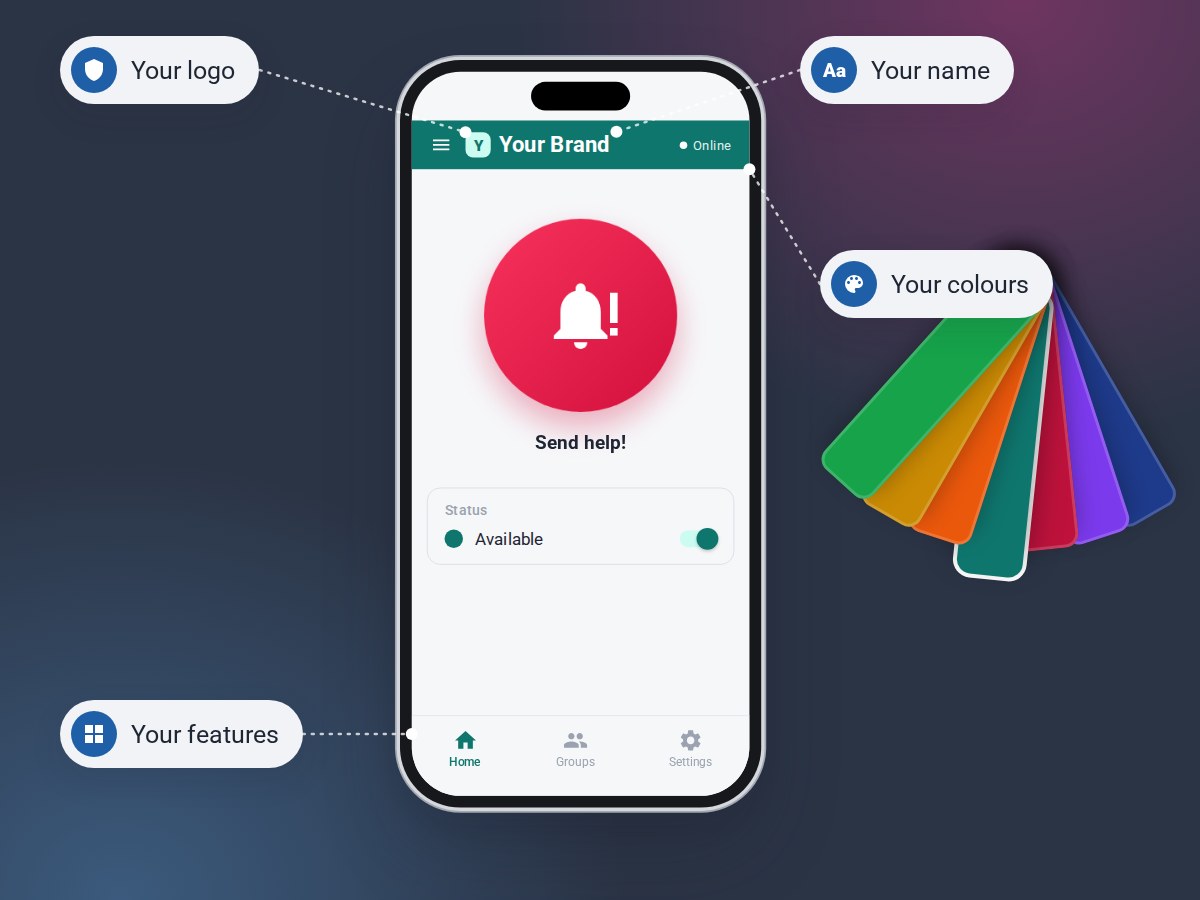
Download, log in, done
Users get a direct link in your brand during onboarding. After login the app is recognisably yours.
Scales without extra cost
No developer accounts, builds or store releases per customer. Add a customer in the platform and their app is ready instantly.
Configured centrally
Features, the bottom bar, sounds and man down settings, set in the platform per customer or even per user.
Built for iOS and Android
Runs on iOS and Android. The phones your customers already carry.
Speaks your users’ language
The app is available in every language of the platform. From English, Dutch and German to Swedish, Czech and Turkish.

★★★★★
Axel Group trusts Cuebly for its remarkable adaptability, allowing us to customize solutions for a wide range of operational needs. The easy interface enables our team to manage alarms effortlessly, boosting efficiency and reducing response times. Backed by exceptional support, we experience consistent performance and quick resolution of any issues. Cuebly ensures we remain agile and prepared for evolving technological demands, safeguarding our operations for years to come.
Gustaf Hedman
Production Manager, Axel Group
Frequently asked questions
Yes. Users download the app from the App Store or Google Play and log in. From then on it shows your logo, colours and selected features. Without a separate store listing per customer.
Lite covers critical messages, assistance requests, manual alarms and availability. Pro adds custom views, man down, timer alarms, automatic presence, chat, alarm buttons, indoor location and the Emerit e-B10. Pro Voice adds Instant Voice with the alarm centre and colleagues directly from the browser.
Yes. Via the Cuebly platform you enable or disable features per customer or user. This keeps the app simple and relevant.
Yes. Alarms from the app can be forwarded to a 24/7 alarm receiving centre, including the alarm type, user, location and voice communication.
Unlike other apps, Cuebly integrates natively with the e-B10. App and button monitor each other and vibrate when something is wrong.
Indoor location uses Wi-Fi and BLE beacons that are mapped in the Cuebly platform. So an alarm shows the floor and room. It is part of Pro.
Ready to give your customers their own safety app?
See the app, the plans and the platform behind it in a demo, tailored to the customers you serve.